


Showing posts with label Phones. Show all posts
Showing posts with label Phones. Show all posts






Fly unveiled a new luxury phone
 3:05 AM
 Unknown

Fly unveiled a new luxury phone Fly E181 Sophie , which are designed for women. New Fly E181 Sophie has a very similar view on Fly Princess Q410 and Fly MC180 Desire , as well as the same Swarovski crystals decorated body. New Fly E181 Sophie dual SIM phone , which is supplied together with other functions needed.

Features
* 2.8-inch capacitive touch screen * Screen resolution 320 x 240 pixels * 3.2-megapixel camera * FM Tuner , music and video player * Bluetooth and Wi-Fi * Supports microSD cards for memory expansion * Equipped with two SIM card slots * Decorated with Swarovski crystals * Comes with the Opera Mini browser * Power 950 mAh * Provides up to 7.5 hours of talk time and 188 hours standby
 Posted in
Phones
Posted in
Phones

The latest generation from iPad
2:55 AM
Unknown

The latest generation from iPad as reported by CyberNews from Digitimes will be present with five new features. Initial information obtained by Digitimes, citing news came from Chinese-language newspaper, Economy Daily News (EDN).
Yes, Apple iPad 2 is equipped with a video phone, the new display technology, three-axis gyroscope, better mobility, and USB support.
The possibility of a video phone feature is the actual FaceTime already immersed in many Apple products, ranging from Mac OSX to the latest generation iPod touch.
New display technology is being applied is the retina display like on the iPhone 4 and Gorilla Glass. To support 3-axis gyroscope is actually already installed on the iPhone 3, so that actually no longer a new thing.
But it turns out better mobility remains a question for Apple iPad 2, whether smaller or lighter and Have supports GSM-CDMA?
You’re curious to prove the greatness of five of these features? It appears you need to be patient until the launch of the Apple iPad 2 in April 2011.
Posted in
Phones
phones playstation
2:49 AM
Unknown

It's always fun to see the details to come trickling on a new phone – “. Phone Playstation”, especially as the long-awaited phone in the coming Well, some pieces of the puzzle begin to fall into place. European trade mark has been granted to “Xperia Play” on December 1. In addition, domain names, “XperiaPlay.com”, “XperiaPlay.net” and “XperiaPlay.org” have been registered. These factors give a lot of faith rumor name. Pocket-lint is also reporting a rumor that the device will be officially announced at the Mobile World Congress in February, coming and will be available in stores in April.
Posted in
Phones
Sony ericsson ViVaZ
1:03 PM
Unknown

Sony Ericsson Vivaz featured 'human curvature' design that reflects the curve of the human body. Sony Ericsson Vivaz has 1.8-megapixel camera, which memiiki ability to record 720p HD video quality, Sony Ericsson Vivaz where users can watch a video on the touch screen 3.2-inch wide. Sony Ericsson Vivaz has Symbian OS v9.4 and features MP3 player and FM radio, Bluetooth, and Wi-Fi, and HSDPA high speed internet.

Specifications
Network: GSM 850 / 900 / 1800 / 1900 / UMTS 900 / 2100
Form Factor: Block / Symbian OS v9.4
Dimensions: 107 x 52 x 13 mm
Weight: 97 g
Antenna: Internal
Navigation: Touch Screen
Battery Type: Li-Ion
Talk Time: 13.00
Standby Time: 430
Memory: 95.0 MB
Expandable Memory: microSD / TransFlash
Safety
Radiation (SAR)?
Imaging
Main Screen: 16700000 colors (TFT / Accelerometer) 360 x 640 px
External Screen: No
Camera: 8.1 MP / Flash / 4X Zoom / Auto-Focus / Face Detection / Smile Detection / Image Stabilizer / Geo-Tagging / HD Video Recorder
Audio
MP3 Player: MP3 / AAC / PlayNow / TrackID
FM Radio: RDS Radio
Speakerphone: Yes
Push-To-Talk: No
Multimedia
Wallpapers: 360 x 640 px
Screen Savers: 360 x 640 px
Ring Tones: MP3
Themes: Yes
Games: J2ME / 3D Gaming
Streaming Multimedia: YouTube
Messaging
SMS: Yes
EMS: Yes
MMS: Yes
Email: POP3 / IMAP4 / SMTP
Chat: AOL / Windows Live / Yahoo
Predictive Text: Handwriting Recognition
ApplicationsNetwork: GSM 850 / 900 / 1800 / 1900 / UMTS 900 / 2100
Form Factor: Block / Symbian OS v9.4
Dimensions: 107 x 52 x 13 mm
Weight: 97 g
Antenna: Internal
Navigation: Touch Screen
Battery Type: Li-Ion
Talk Time: 13.00
Standby Time: 430
Memory: 95.0 MB
Expandable Memory: microSD / TransFlash
Safety
Radiation (SAR)?
Imaging
Main Screen: 16700000 colors (TFT / Accelerometer) 360 x 640 px
External Screen: No
Camera: 8.1 MP / Flash / 4X Zoom / Auto-Focus / Face Detection / Smile Detection / Image Stabilizer / Geo-Tagging / HD Video Recorder
Audio
MP3 Player: MP3 / AAC / PlayNow / TrackID
FM Radio: RDS Radio
Speakerphone: Yes
Push-To-Talk: No
Multimedia
Wallpapers: 360 x 640 px
Screen Savers: 360 x 640 px
Ring Tones: MP3
Themes: Yes
Games: J2ME / 3D Gaming
Streaming Multimedia: YouTube
Messaging
SMS: Yes
EMS: Yes
MMS: Yes
Email: POP3 / IMAP4 / SMTP
Chat: AOL / Windows Live / Yahoo
Predictive Text: Handwriting Recognition
Phonebook Capacity: ???
Calendar: Yes
To-Do List: Yes
WAP: 2.0 (Webkit / Google Search)
Voice Commands: Yes
Calculator: Yes
Connectivity
Bluetooth: 2.0 (A2DP / AVRCP / DUN / HFP / HSP / OPP / SPP)
Infrared Port: No
High-Speed Data: HSDPA
Wi-Fi: 802.11 b/g / DLNA
GPS: Google Maps / Wisepilot
PC Sync: USB 2.0 (ActiveSync) / TV Out
Posted in
Phones
Sony ericsson Xperia X10
12:56 PM
Unknown

Xperia X10 series is the family of Xperia. The latest series of Xperia series is using Android 1.6 OS already on customization by Sony Ericsson.
With a design without a QWERTY touch screen Sony Ericsson Xperia X10 looks more elegant. How can the advantages and disadvantages of this smartphone, the T & T online will try to review this smartphone.
Touchscreen candybar design, so it looks solid. With the right size, make it fit your smartphone while on the handheld.
With wide-screen 4 inch capacitive touchscreen with WVGA resolution (480 x 854 pixels). The screen also has is equipped with a scratch-resistant surface, making wide-screen Sony Ericsson Xperia X10 is resistant to scratches.
Display is full color, with a 16M-color (65K colors effective under the Android OS v1.6) makes the Sony Ericsson Xperia X10 display is bright and cool. Sony Ericsson Xperia X10 uses QSD8250 Qualcomm Snapdragon processor 1 GHz CPU, OpenGL ES 2.0 support, 384 MB of RAM, therefore the look and performance of cool and fast.

Sony Ericsson Xperia X10 has a lot of features. The most mantab of Xperia X10 is a feature Timescape and Mediascape UI. Timescape is a feature thatspilled all the social networking and email in one application ,so klo want to see the update status or another in many new social networking or email in your email is only open one application .
Almost the same as Timescape, Mediascape also like that but Mediascape it for multimedia applications, open one application for all applications.
Although cool and a lot of applications and advanced features turned out the Sony Ericsson Xperia X10 does not have FM radio, so for fans of Radio with a smartphone X10 will be a little disappointed.
Connectivity
Sony Ericsson Xperia X10 is already support with connection 10.2 Mbps HSDPA and 2 Mbps HSUPA. Not only that, for the affairs of the connection is complete, because Xperia X10 is also equipped with Wi-Fi.
Multimedia
Sony Ericsson Xperia X10 is already have a digital camera 8 MP autofocus camera with LED flash, touch focus, image stabilization, geotagging, face and smile detection
Uniquely in the messaging features of the Sony Ericsson Xperia X2 smsnya this, such as chat smsnya view, so more mudha to find out what we have just sent and what we have just received from and to the same.
SpecificationsNetwork: GSM 850 / 900 / 1800 / 1900 / HSDPA 900 / 1700 / 2100
Form Factor: Block / Google Android OS v1.6
Dimensions: 119 x 63 x 13 mm
Weight: 135 g
Antenna: Internal
Navigation: Touch Screen
Battery Type: Li-Ion
Talk Time:?
Standby Time:?
Memory: 1.0 GB
Expandable Memory: microSD / TransFlash
Safety
Radiation (SAR)?
Imaging
Main Screen: 262000 colors (TFT / Accelerometer / Gesture Control / Scratch-Resistant) 480 x 854 px
External Screen: No
Camera: 8.1 MP / Flash / 16X Zoom / Auto-Focus / Touch Focus / Image Stabilizer / Face Recognition / Smile Detection / Geo-Tagging / Video Recorder
Audio
MP3 Player: MP3 / AAC / PlayNow / TrackID
FM Radio: No
Speakerphone: Yes
Push-To-Talk: No
Multimedia
Wallpapers: 480 x 854 px
Screen Savers: 480 x 854 px
Ring Tones: MP3
Themes: Yes
Games: Android Market
Streaming Multimedia: YouTube
Messaging
SMS: Yes
EMS: Yes
MMS: Yes
Email: POP3 / IMAP4 / SMTP / Gmail
Chat: AOL / ICQ / Google / Windows Live / Yahoo
Predictive Text: T9
Applications
Phonebook Capacity:?
Calendar: Google Calendar
To-Do List: Yes
WAP: 2.0 (Webkit / Google Search)
Voice Commands: Yes
Calculator: Yes
Connectivity
Bluetooth: 2.1 (A2DP / AVRCP / HFP / HSP)
Infrared Port: No
High-Speed Data: HSDPA
Wi-Fi: 802.11 b / g
GPS: Google Maps Navigation / Wisepilot
PC Sync: USB 2.0
Posted in
Phones
Sony Ericsson windows mobile 8 concept
12:43 PM
Unknown
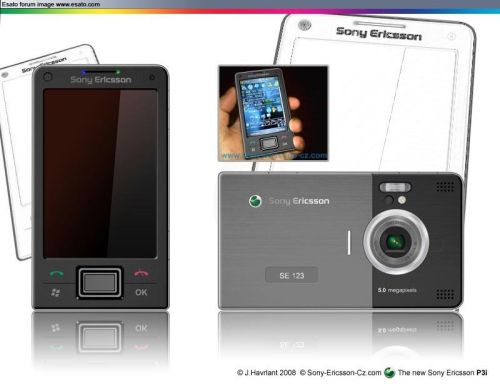
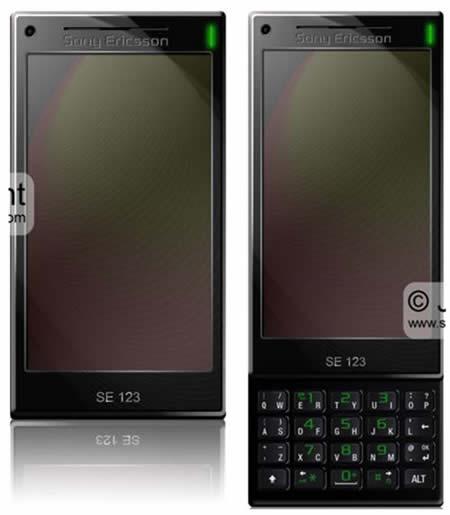
A couple of days ago we showed you some shots of a supposed Windows Mobile 8 design on a Sony Ericsson device, courtesy of Esato board user Remort1. Now, the designer published a bunch more shots of the concept OS, showing its media functions and its media center.

The device and its platform look great in landscape mode and the handset looks like some future XPERIA, if you ask me. I’m really curious to find out the resolution and diagonal of the display on this smartphone, plus the required processor to run such an OS…
Let’s speculate a bit: Qualcomm’s upcoming 1.5 GHz processor, 512 MB RAM and quite a bit of ROM? Posted in
Phones
Posted in
Phones
Windows mobile 8
12:37 PM
Unknown

We just got the scoop from Microsoft on Windows Mobile 7 and Windows Mobile 8, the two upcoming platforms that will fix what is undeniably broken about the Windows Mobile platform to date. This was originally going to be a piece about how Microsoft had no idea what the consumer wanted, where I would explain what I thought Microsoft needed to do to fix it. Oh, I still discuss the flaws, but while talking to the Windows Mobile team, I learned about the next two versions of the mobile OS. Turns out, Microsoft knows exactly what’s wrong with the WM platform, and it knows what to do to fix it. Trust me: there’s hope on the horizon.

Before I get to the big Windows Mobile fix, it’s important to see where it is now. Take a look above at the Windows Mobile Professional (the touchscreen version) and Windows Mobile Standard (the non-touchscreen, usually slimmer version). Got a good look?
The number one biggest problem with Windows Mobile is its UI.I have no problems with Windows itself, and I work on a Vista PC (along with a Leopard Mac) every single day. WM’s problem is that it isn’t Windows. Here are a few of the unnecessarily complicated attributes that Windows Mobile doesn’t share with desktop Windows:
• It’s very hard to multitask. Multitasking is there, and you can run multiple programs at the same time, but everything is “full screen” and there’s no easy way to switch between apps. There’s no task bar to see what apps are open, and there’s no indicator to the user that anything else is open. You actually have to dig into the Start menu, then Settings, then the System tab, then Memory, then the Running Programs tab just to see what’s going on! Microsoft fixed this by inserting a dropdown task manager in more recent builds of Windows Mobile 6, but you still can’t jump from app to app with ease. Which leads us to…
• Closing a program doesn’t really close it. You’d think that pressing the “X” button on an app closes it, but all it does is minimize it. You have to dive into the menus to terminate a program or, on a newer build, go back to the Home/Today screen and close via the top-right icon. Not exactly what we call convenient.• Different builds work differently. We can see why there are two major versions of Windows Mobile for phones—Professional and Smartphone—since different form factors require different UI philosophies for input. But when you compare the Tablet PC version of Windows with the standard desktop version, there isn’t that huge of a difference. If you know how to use one, you should know how to use the other. Not quite so when you switch from the stylus input of Windows Mobile Pro to the D-Pad of Windows Mobile Smartphone. This isn’t noticed by the masses, since most people only use one Windows Mobile device, but it is a telling concern. Plus, getting around with that D-Pad sucks.
Beyond OS structural design, the day-to-day usage of Windows Mobile isn’t what you’d call “friendly,” either. In fact, it’d probably punch you in the face if you even made eye contact. Take dialing, for instance. How can the main purpose of a phone—calling someone—be so hard to do?
Posted in
Phones
Subscribe to:
Posts (Atom)


